

It’s a good idea to have a clone of your entire website to test as much as possible on your WordPress site before making any real changes on your production site.
WP STAGING allows you to create a site for testing purposes and is your specialized tool to copy a staging site and all of its data to the production site.
Even better, it also allows you to create a clone of an already existing staging site and allows you to copy this cloned site to the parent clone as well.
This allows you to create a development and staging website beside the production system, a structure that is widely common and used by professional developers all over the world:
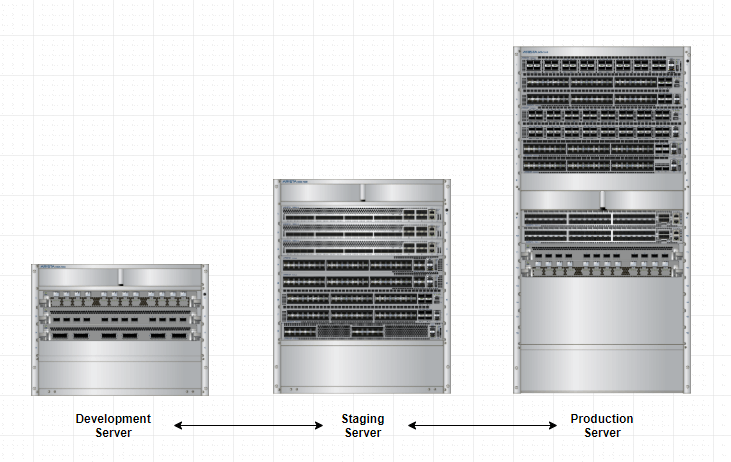
This development structure helps you test all the steps from cloning to pushing and make sure there are no errors in that process chain before you repeat the steps on your production website.
If you like to clone a staging site created with WP STAGING, you first need to tell WP STAGING that the cloned staging site is allowed to be cloned.
You can follow one of the two options to do so:
- Create an empty file named
.wp-staging-cloneableand add it into your staging site’s root folder using a file manager plugin or FTP.
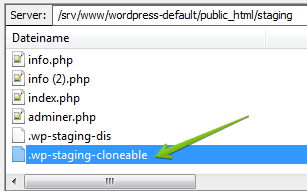
Alternatively, you can create a little modification in the database table wpstg(int)_options of the staging site:
- Open PhpMyAdmin and look for the option_name
wpstg_is_staging_sitein the tablewpstg(int)_optionswhich belongs to the staging site. - Set this value to
falseor delete it at all:
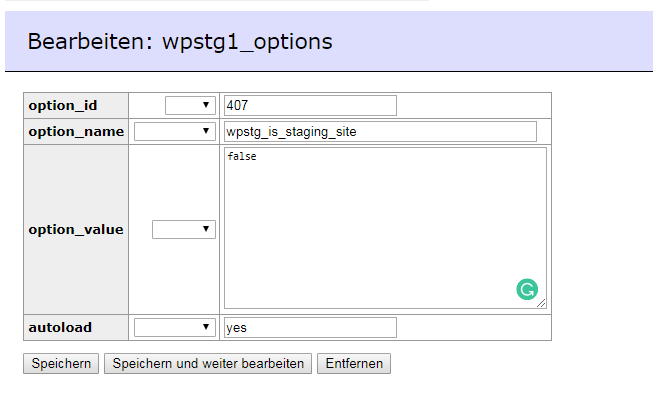
As always, please make a full database backup before you are going that route and changing anything in the database!
If you’ve made any of these changes, you can start creating a clone of the staging site by going to
Staging Site > wp-admin > WP Staging > Start
So, for instance, you can name your first staging site “Staging.” Then you go to Staging > wp-admin > WP Staging > Start and name the clone of the clone “Development.”
Now you can work on the “Development” site and modify anything there without being worried about breaking anything on your production website.
When you are done, and you like to copy the staging site to the production site, log in to your production site, and open WP STAGING. There you can push the site “Staging” to the production site.